
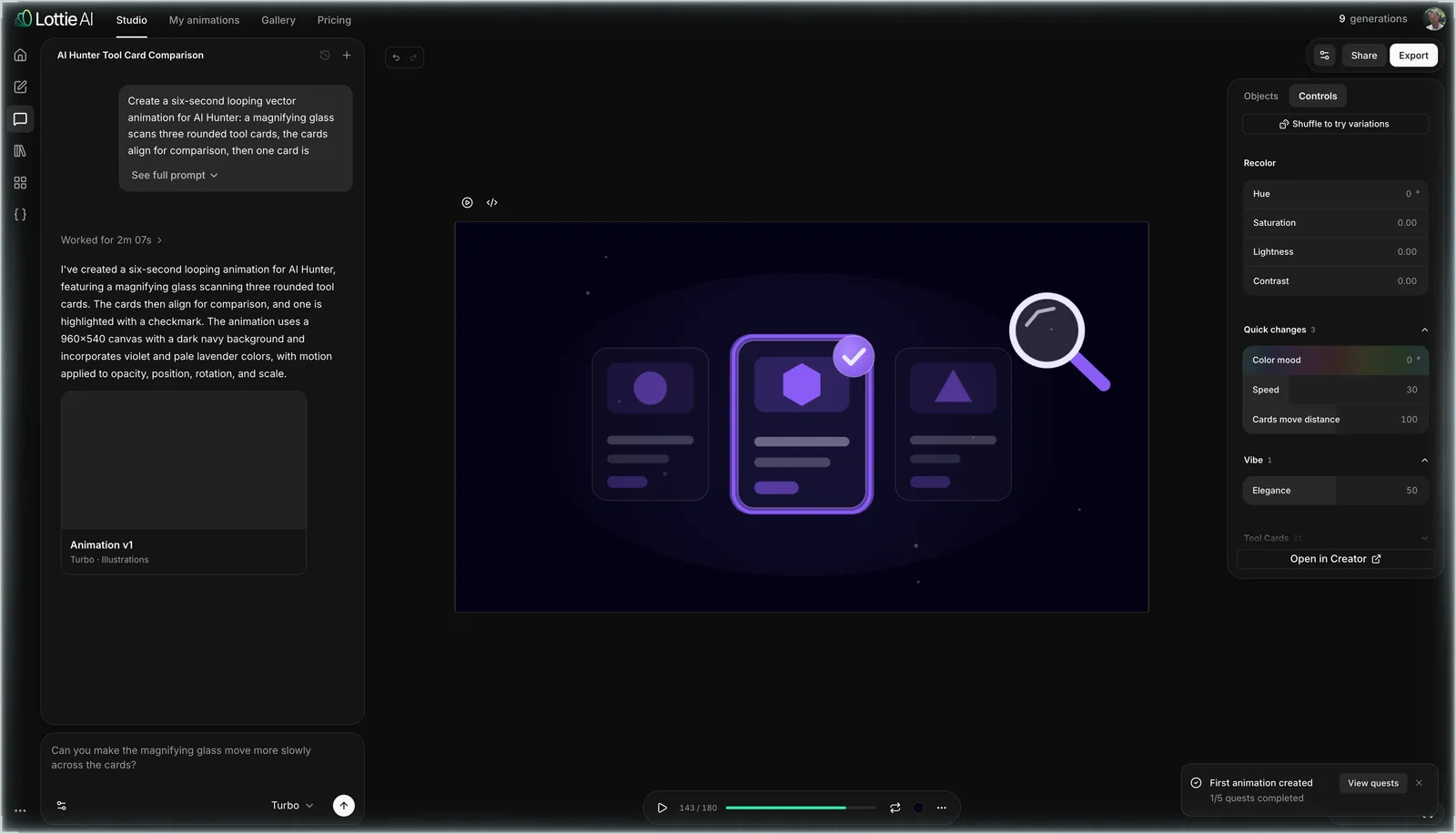
Landing pages often need to explain a flow in a few seconds: search, compare, pick. A screenshot shows one step rather than the sequence. Producing a custom animation takes time, especially when colors or the story change. Lottie AI offers a workflow: describe the animation in a sentence, adjust it without regenerating everything, then download a vector file ready for the web. We put it to work on a real case, the AI Hunter user journey.
The brief: three cards, a magnifier, a choice
We asked for a six-second vector loop at 960×540: a magnifying glass scans three tool cards, the cards line up for comparison, then one gets a checkmark. Constraints: no text, no logos, navy #030314 background, violet #8B5CF6 and pale lavender #EDE9FE, calm motion.
The Starter account showed 10 generations before the test. We used exactly one, in Turbo · Illustrations mode. The editor reported “Worked for 2m 07s”, which is the product’s own figure rather than an end-to-end stopwatch time. Afterwards the counter read 9.
The result, live on this page
What you see below is the exported JSON, untouched, running in our own player.
Open the demo full screen · Download the original files: dotLottie · JSON · MP4
The three cards carry geometric icons, the magnifier starts on the left, and around 4.8 seconds the center card is highlighted with the checkmark. The requested palette is visually respected. The animation runs 6 seconds, 180 frames at 30 fps, 960×540, as both the JSON and the MP4 confirm.
One rough edge: the editor kept a stale loading indicator in the background although the animation was ready. Reloading the conversation showed the result without triggering a new generation.
Editing without starting over
This is the tool’s core promise. The plans and credits documentation separates generating or refining by prompt, which costs, from adjustments applied without regeneration, which it describes as free.
We tested one adjustment: Controls > Recolor > Hue, moved from 0 to 100. All the violet turned coral almost instantly, and the counter stayed at 9. Undo then brought back the original palette.
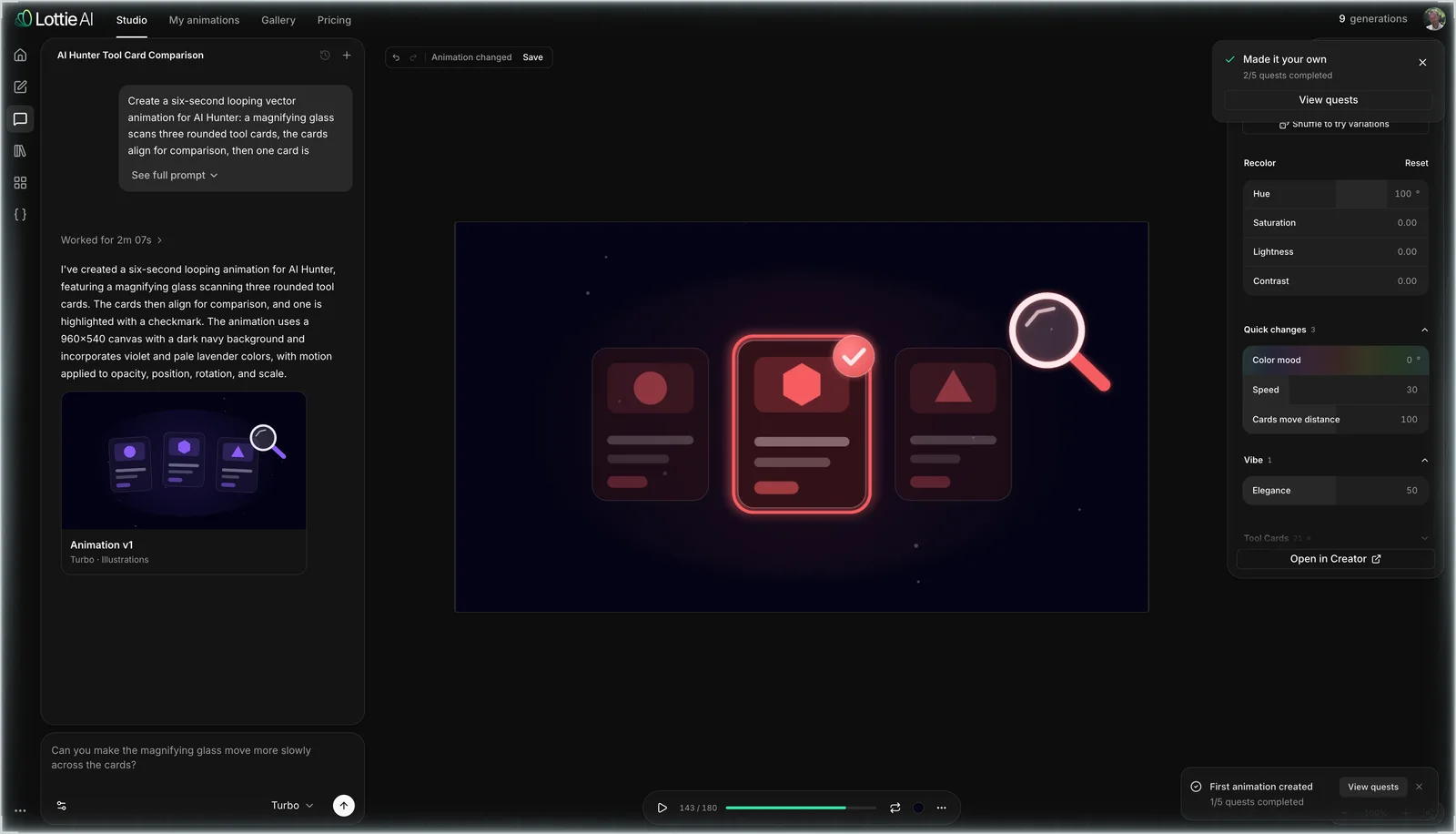
To be clear, this is a global hue shift, not typing an exact hex code into a specific element. Our test therefore does not establish how well precise brand-color replacement works. We did not test prompt-based edits, Quality mode, opening the file in Creator or SVG import.
Exports: what we actually downloaded
The export help page lists dotLottie, JSON, video, images and code. We downloaded three formats:
| Format | File size | What we checked |
|---|---|---|
| dotLottie | 9.8 KB | Valid archive with the JSON animation inside |
| Lottie JSON | 114.8 KB | 22 layers, no external images, 960×540, 30 fps, 180 frames |
| MP4 | 709.5 KB | H.264, 960×540, 30 fps, 6.000 s, no visible watermark on the frames at 1 s and 4.8 s |
These are file sizes only. Showing a JSON or dotLottie file on a website needs a compatible player, whose weight comes on top. Our demo uses lottie-web 5.13.0 for JSON; dotLottie needs a player that supports that container. So this is not a page-load benchmark, and the gap between dotLottie and JSON applies to this file, not to every animation.
One concrete limit: for this animation, the Jetpack Compose export was disabled, flagged as unsupported because of trim paths under a drop shadow. We did not test the other formats in the menu. Not every format is guaranteed for every animation.
The player and its buttons are ours
Play on demand, the Play/Pause button and pausing when the system asks for reduced motion (prefers-reduced-motion) come from our integration, not from the exported file. We checked the layout at 960 and 390 pixels wide with no overflow. If you embed a Lottie animation, plan for these behaviors on your side.
Credits and usage rights
Starter offers 10 generations that do not renew. Paid plans run on monthly credits, at 5 credits per generation or prompt-based edit according to the same documentation. A credit is not a price, so check the pricing page before you budget.
On rights, section 5 of the Lottie AI terms allows commercial use of outputs generated by Lottie AI, including on the free plan. That permission does not establish the rights for library assets or uploaded material, which need to be checked separately.
Who is it for?
A good fit for marketing teams and web agencies that ship micro-animations: illustrating a step in a user journey, animating an empty state, giving rhythm to a landing page section. Vector output and credit-free hue changes make per-client variants easy.
Not a fit if you need realistic video, filmed characters or a voiceover. For that, our roundup of the best image-to-video AI tools is the better starting point.
Our verdict
In our test, Lottie AI delivered an animation that matched the brief in a single generation, light in vector form and exportable as dotLottie, JSON and MP4. Credit-free recoloring is handy for spinning off variants, though it stays global. It is a solid pick for producing editable website animations quickly, as long as you bring your own player and confirm the export you need before committing.
FAQ
Is Lottie AI free?
The Starter account includes 10 generations that do not renew. Paid plans run on monthly credits, and each generation or prompt-based edit costs 5 of them. Credits are not dollars, so check current pricing on the official page.
Does changing colors use up a generation?
Not in our test. The Recolor setting in the Controls panel changed the hue instantly and the counter stayed at 9 generations. The official documentation also describes adjustments that do not regenerate the animation as free.
Can I use the animation in a commercial project?
Section 5 of the Lottie AI terms allows commercial use of outputs generated by Lottie AI, including on the free plan. That does not automatically extend to other LottieFiles assets or to material you upload yourself.
Which format should I use on a website?
JSON or dotLottie, played through a Lottie player, keep the animation vector-based. MP4 is better suited to social media or tools that only accept video. Remember to count the JavaScript player, which adds to the file weight.
Tools mentioned
Find the best AI tool
215 tools listed with features and pricing. Find the one that fits your needs.