
You have a specific proposal for a specific company, and you need the right person, not a list of four hundred names. That was our situation: finding the relevant marketing contacts at HeyGen for an editorial partnership with AI Hunter.
Our verdict: on this search, Seamless.AI took us quickly from an unmanageable volume to a short, readable list, thanks to company and department filters and strict company matching. Revealing one contact surfaced an email, phone numbers and a list of technologies. What we did not check matters just as much: no email was sent, so nothing here proves those details are correct. The tool helps you target, and validation remains your job.
You can open a Seamless.AI account to run the same process on your own target. AI Hunter may earn a commission if you subscribe through this link, at no extra cost to you. For the full tool profile, see our Seamless.AI review.
What we tested
We used a real account and its contact search. One company, one query, one revealed contact. We did not test exports, CRM integrations or email sequences. It was a short session, so read the numbers below as one realistic query, not as a benchmark of the database or of its coverage in any given country.
What we observed
Filtering on the company heygen.com with default matching returned 403 contacts. Adding the Marketing department brought it down to 39. Switching company matching to strict left 36 results, so 3 profiles were removed. Before that switch, at least one profile tied to another company, VinusClub, appeared in the list. We do not derive a general error rate from this: it is one query on one company.
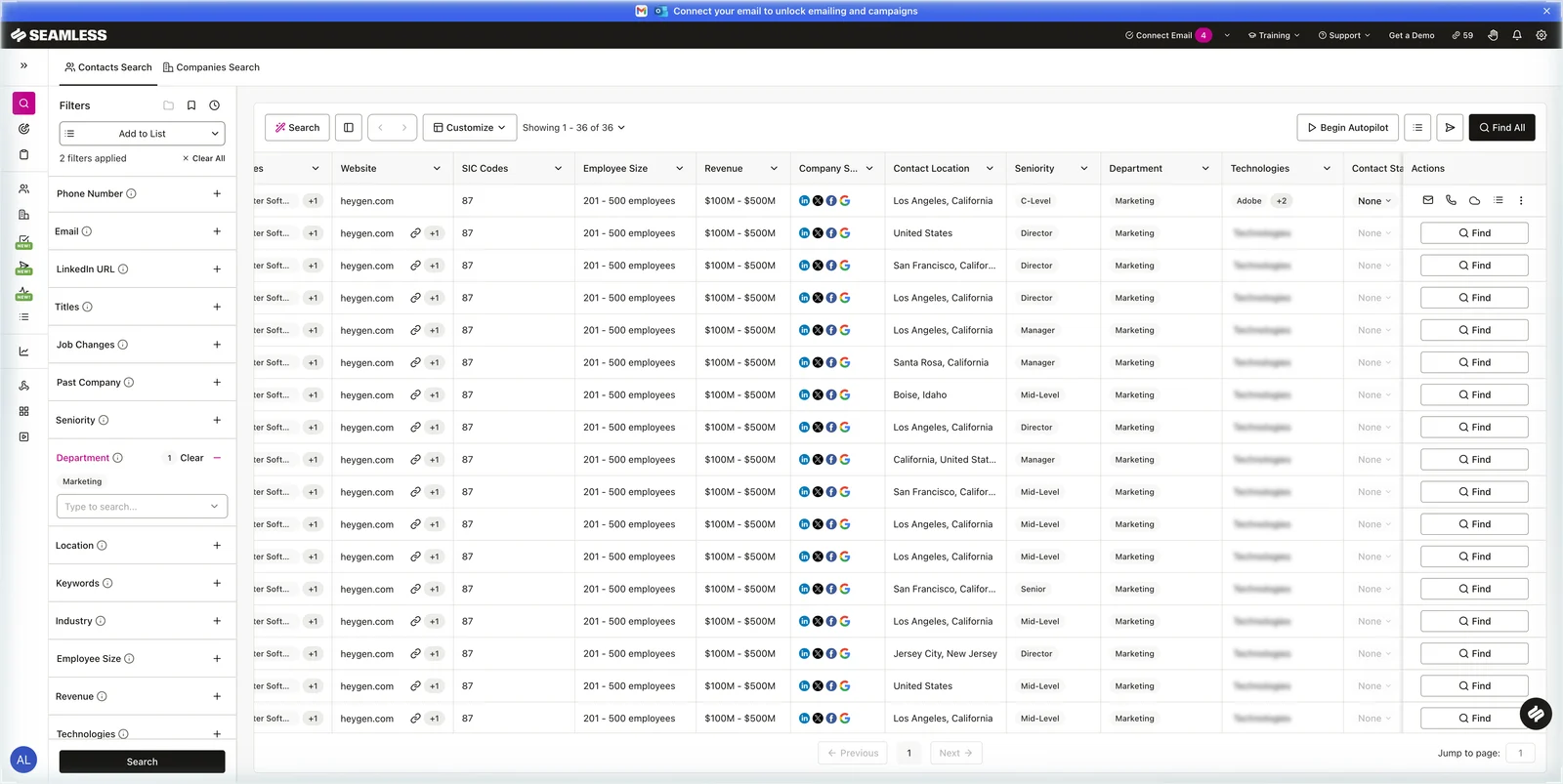
The remaining titles included a CMO, content marketing and product marketing roles, growth marketing, and also design. The Marketing department is broad: not every one of these profiles decides on a partnership.
We clicked Find on a single profile, the CMO. An email and phone numbers appeared, along with a list of technologies. We sent no message and did not check deliverability.
The test at a glance
| Observed step | Result | What it means |
|---|---|---|
| Company filter heygen.com, default matching | 403 contacts | Too broad to choose from |
| Adding the Marketing department | 39 contacts | A list a human can actually read |
| Strict company matching | 36 contacts, 3 removed | Worth switching on before shortlisting |
| Reading job titles | CMO, content, product, growth, design | A department is not a decision-maker |
| Find on one CMO profile | Email, phones, technologies shown | Data to verify, not proof of accuracy |
Pick the right person, not the most rows
For an editorial partnership (a review, a comparison, a feature), the person running content or product marketing is more likely to own the topic than a CMO, who tends to arbitrate budgets. Growth may handle acquisition partnerships. Design has little to do with this kind of pitch. Adapt this reasoning to your own proposal: the pitch decides the role, not the number of results.
The method to reproduce
- Write your pitch in one sentence and derive the target role from it.
- Filter by company domain, then by department.
- Switch company matching to strict and compare totals. Look at what disappears.
- Read the titles and keep two or three profiles.
- Reveal contacts one at a time rather than in bulk with Find All.
- Before writing, cross-check the role and address against an independent source, such as the company site or a public profile.
Pricing and credits
The official pricing page lists a free plan with 50 credits, while paid plans are quoted on request. The official article on credit and license types explains how credits work: read it before planning any volume.
To decide, test your own case on the free plan: one target company, one role, a few reveals. If the shortlist is relevant and the contacts check out, a paid plan may be justified for regular volume. If you only approach a few companies a month, manual research may be enough.
Seamless.AI or something else?
- Manual research: a handful of targets and time to read each company’s site and public profiles. No database needed.
- Prospecting database for a team: regular volume, several people searching, a need for consistent filters. That is where a tool like Seamless.AI fits.
Frequently asked questions
Does strict company matching really change the results?
On our query, it removed 3 of 39 profiles, including at least one tied to another company. That is one search, not a general rate, but the check is easy to run.
Is the Marketing department filter enough to find a decision-maker?
No. It grouped a CMO, content, product and growth marketing roles, and also design. Read the titles and choose based on your proposal.
Are the contact details Seamless.AI reveals accurate?
We cannot say: the revealed contact showed an email and phone numbers, but no message was sent. Verify the role and address before any outreach.
Can I test Seamless.AI for free?
Yes. The official pricing page lists a free plan with 50 credits. Paid plans are quoted on request.
Should I reveal the whole list with Find All?
For targeted outreach, it is better to reveal contacts one at a time after reading the titles. You stay in control of your credits and of each profile’s relevance.
Next step
Start with one company and one role you genuinely want to reach, switch on strict matching, reveal a single contact, then verify it before writing. Try Seamless.AI on the free plan.
Tools mentioned
Find the best AI tool
215 tools listed with features and pricing. Find the one that fits your needs.