
By Alex, AI Hunter

Generate, run, analyse.
A renamed button or a moved field can break a test while the product still works. QA then has to repair the scenario before looking for real defects. We set out to test that maintenance problem between releases.
Thunders brings test creation, execution and maintenance into one platform. QA and product teams describe the expected journey in plain language; agents run it and document the outcome. The aim is to grow regression coverage without spending every release repairing tests. We evaluated that promise on a booking flow: the frozen scenario passes after a redesign and fails when the price becomes wrong.
Understand Thunders in a minute
Create a test from the journey you already know
You don’t need to know how to write a script to get started. You need to know what the user does and what they should see at the end. Test generation happens in three stages.
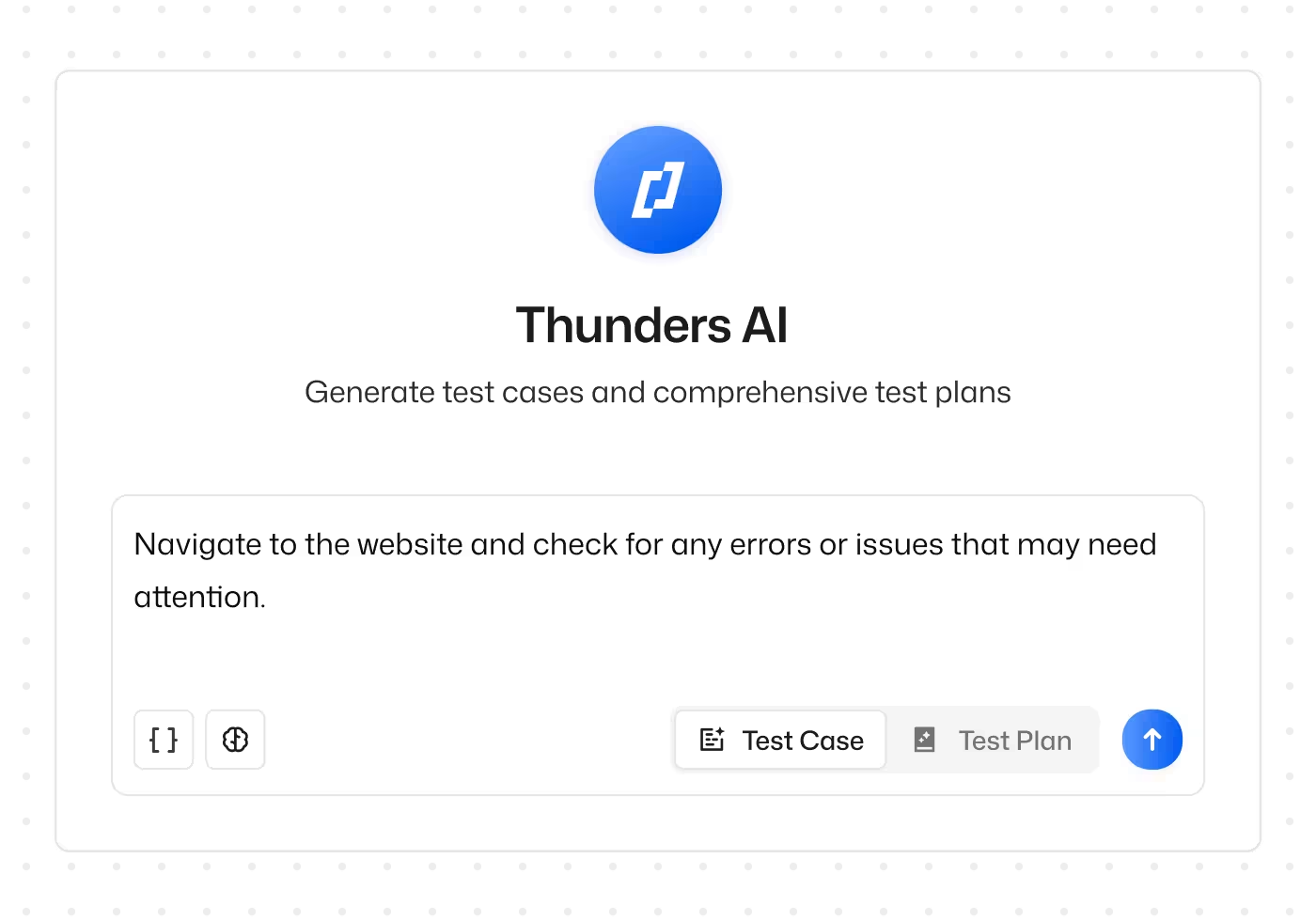
- Say where to test. You create an environment that points to your application’s URL. Thunders visits the page to spot the fields and buttons before suggesting anything.
- Describe the actions and the expected result. Our request, paraphrased here for the example, looked like this: “Book two seats, enter a name, check that the total shows €80, confirm, then check that the confirmation mentions two seats and €80.” The point that matters: say what must be true at the end, not just where to click. These checks are what give the test its value.
- Review, run, stabilise. Thunders suggests readable steps, which you can correct in conversation or by hand. You run the test, you adjust, then you lock it once it passes twice in a row.
The platform generated seven steps, including two price checks. After the setup described in the protocol, we froze the scenario for the rest of the test.
The test in 55 seconds
Read the montage transcript (text)
The scenario survives the redesign
We then did what a product team does regularly: rework the interface. The “Number of seats” list became “Seats for this workshop”, the “Full name” field is now called “Booking name”, and the “Confirm booking” button became “Reserve my seats”. The technical identifiers of the three controls, the layout and the styling changed too. The journey and the price stayed the same.
The locked test passed on all seven steps. Three actions carry the Self-healed badge: selecting the seats, entering the name and clicking the button, which are exactly the three controls we had changed. The test was not edited between stabilisation and this run.
Thunders presents its self-healing as an intent-based search: when the expected element is no longer there, the platform looks during the run for the one that plays the same role. In our trial, these changes to labels, identifiers and layout required no manual rework of the journey: that is precisely the maintenance you want to avoid between two versions.
To see what the test was looking at, choose two seats in the demo below, then switch interfaces. It runs in your browser and does not launch Thunders.
Understand what the test did
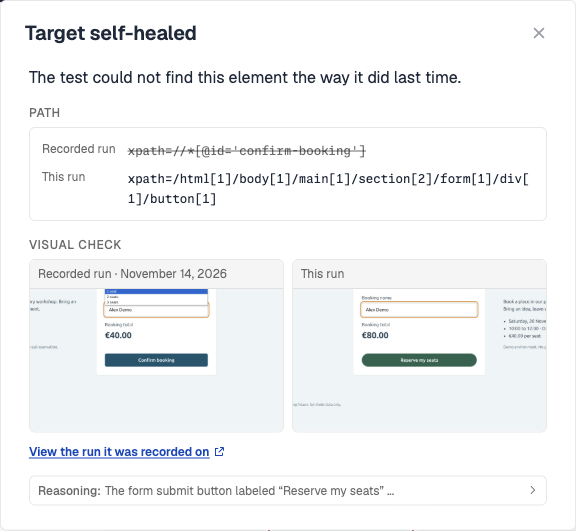
A test that adapts on its own is only useful if you can check what it adapted. The repair panel for the button we inspected shows the element’s old locator, the new one, two screenshots of the page and the reasoning followed. For our button, the conclusion can be read by anyone: “Reserve my seats” is the button that confirms the booking. You can therefore check the element that was chosen, instead of relying on the green result alone.
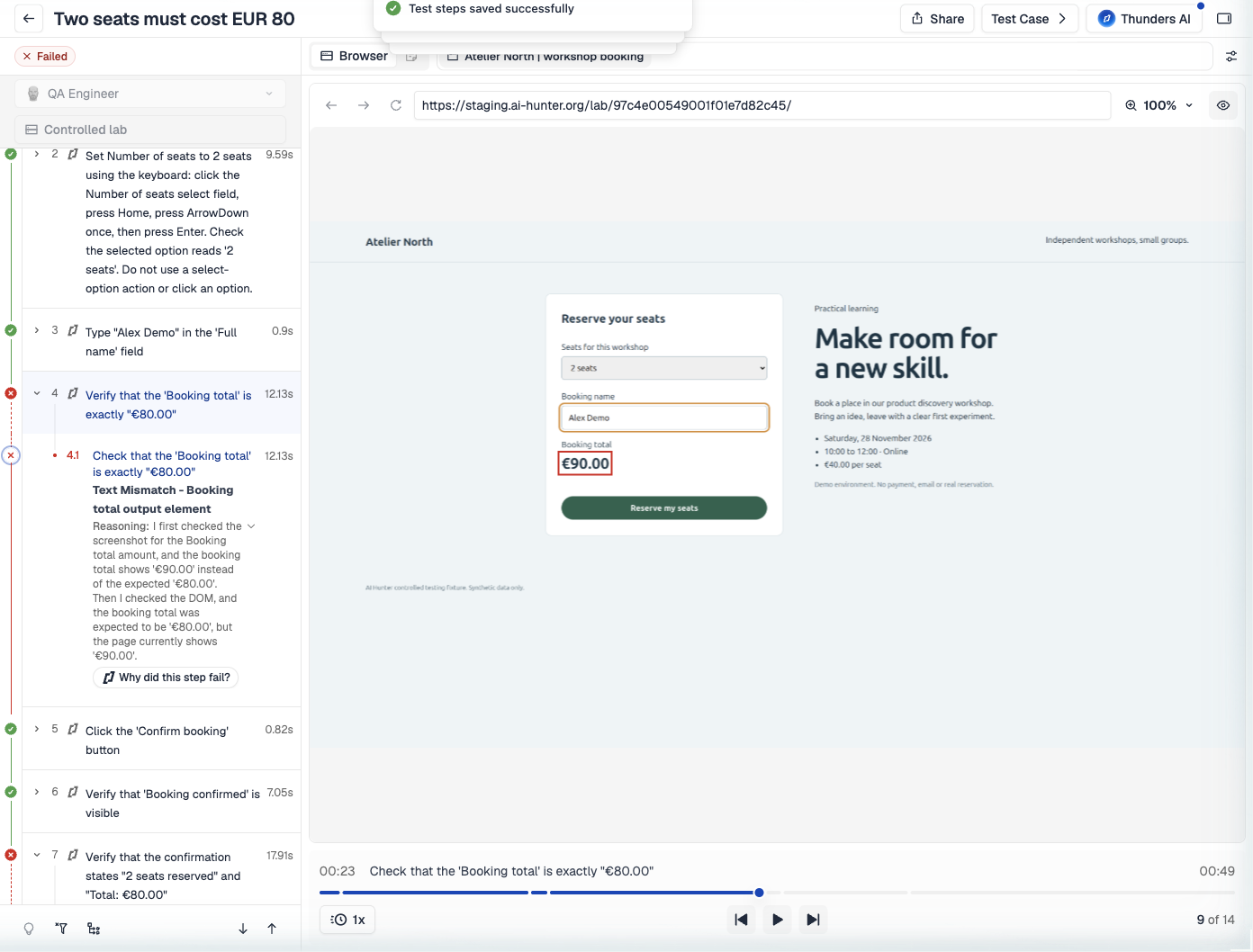
That leaves the question that worries every QA team: will such an accommodating tool also accommodate a real bug? We slipped an error into the calculation. The page still advertises €40 per seat, but calculates 45. Two seats come to €90 instead of €80.
The test failed, and the run report says why: €80 expected, €90 observed. The run did not stop at this first error. The button was clicked, the confirmation appeared, the number of seats was validated, then the second price check failed in turn. In a single read, you know that the booking works and that only the amount is wrong, which points straight to the calculation.
Beyond our form
Thunders.ai is an end-to-end testing platform covering web, APIs, native mobile and desktop. Native mobile is included in Pro and Enterprise, while Playwright export is included in Enterprise. Our test covered web only. Compare plans
Coverage Map shows which screens and journeys the tests cover and where gaps remain. In beta as of 20 November 2026; we did not use it in our test.
Thunders provides API testing, integrations with Jira, Linear, Notion and Xray, and control through MCP. These features depend on the plan and were outside the scope of our web test.
- Start from tickets rather than a blank page. Test generation accepts Jira or Linear specifications, and can be driven from Claude, ChatGPT or Cursor via MCP. The test is born where the feature is described.
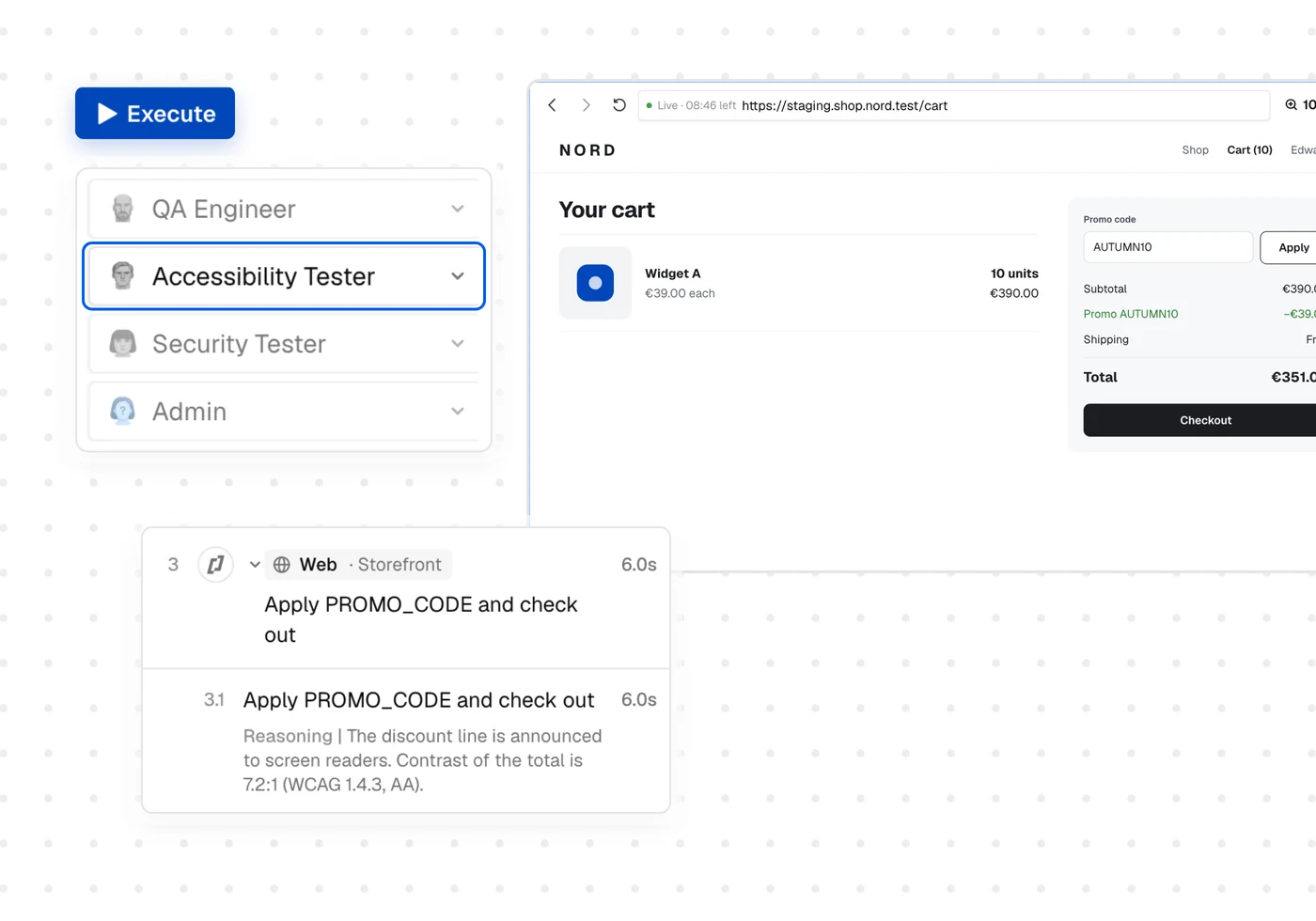
- Replay the same journey through a different lens. Personas examine the same journey from a functional, accessibility, security or SEO angle. We only used the QA Engineer persona. These lenses help spot problems, they are not a certification.
- Plug the tests into delivery. The CI/CD integration triggers runs from the pipeline, to check a version before it goes to production. A failure can be turned into a bug report sent to Jira or Linear, with its context.
What users get from it
At LegalPlace: from test maintenance to QA work
Who it is for, and how to get started
You repeat regression checks by hand
Product and QA teams who know their flows well and replay them manually before each release can describe them and automate them here.
Your interface changes often
If redesigns regularly break selectors and maintenance eats into testing time, self-healing is worth evaluating on your own screens.
You already have a stable coded suite
Playwright itself supports resilient locators. Weigh subscription and migration costs, and start with a pilot. Switching is not compulsory.
Native mobile or Playwright export
Native mobile testing is listed on Pro and Enterprise, Playwright export on Enterprise. Check the current plan details before you commit.
Pricing and credits
Starter
For starting web and API test automation
- Annual billing
- 300 € per month3 600 € billed per year
- Monthly billing
- 399 € per month
- 300 credits / month
- 3 users included
- 2 parallel runs
Pro
For daily suites and native mobile
- Annual billing
- 800 € per month9 600 € billed per year
- Monthly billing
- 999 € per month
- 1000 credits / month
- 5 users included
- 5 parallel runs
Enterprise: custom pricing for advanced governance and deployment needs
Prices exclude tax, checked on 14 November 2026. Official Thunders pricing.
Annual Starter comes to €3,600, against €4,788 for twelve monthly payments of €399: a €1,188 difference, with a different annual commitment. The 300 monthly credits are not 300 tests: consumption depends on creation, the number of steps, personas and usage.
Try it on your own journey
You have 14 days and 100 credits to try Pro features on your own application. Official pricing.
Try Thunders freeTo see where the tool stands against other solutions, read our comparison of AI software testing tools.
Limits of our test
During creation, the native dropdown needed two manual adjustments. Once stabilised, we reran the scenario without editing it, including after the redesign. Those initial adjustments are separate from self-healing. Thunders told us on 20 November that a fix is in progress.
See the protocol and the eight runs
Conditions. Fictional booking mini-application created for the trial, 40 EUR per seat, with no real transaction. All runs took place on 14 November 2026 on Chromium, at 1920 × 1080, from Paris, at the same URL. A single journey, short and synthetic: no mobile, no API, no desktop application, no load measurement.
| No. | Interface | Result | Observation |
|---|---|---|---|
| 1 | Initial | Fail | The click on the “2 seats” option fails, the rest is not executed |
| 2 | Initial | Fail | Selection reported as successful, but the total stayed at 40 EUR |
| 3 | Initial | Pass | Scenario locked, seven steps |
| 4 | Initial | Pass | Identical repeat |
| 5 | Redesigned | Pass | Three actions marked Self-healed |
| 6 | Redesigned | Pass | No new badge visible |
| 7 | Redesigned with bug | Fail | 90 EUR instead of 80 EUR at both price checks |
| 8 | Redesigned, calculation fixed | Pass | Seven steps, test unchanged |
The two corrections during creation. They concern the native dropdown. After the first failure, we replaced the click on the option with a native selection. After the second, we imposed a keyboard sequence (Home, ArrowDown, Enter) followed by a check of the selected option. Neither the application nor the 80 EUR checks were changed. These are manual authoring adjustments, not self-healing.
What the three badges cover. They correspond to the targeting being adapted during the run. We used neither the Heal button, which regenerates a step on the next run, nor the assistant loop that edits and then reruns a test.
The detail of the button.
- Old targeting:
xpath=//*[@id='confirm-booking'] - New targeting:
xpath=/html[1]/body[1]/main[1]/section[2]/form[1]/div[1]/button[1] - The reference run is the second tuning run: it had failed overall, but the click on the button had succeeded in it.
- The two thumbnails in the panel show two moments of targeting the button. This is not a synchronised price comparison between two versions.
Credits consumed. 1.29 credits in total: 0.30 for creating the test and 0.99 for the eight runs. This figure applies to this short journey and is not a reference cost.
Reproduce the trial. The reproduction kit contains the HTML code of the three versions of the page, the protocol and the success criteria.
Frequently asked questions
Can Thunders self-healing hide a real bug?
It did not hide the bug in our test: a deliberately wrong EUR 90 total instead of EUR 80 caused both price checks to fail.
Does Thunders test more than web applications?
Yes. The platform covers web, APIs, native mobile and desktop. Our test covered web only; native mobile is included in Pro and Enterprise.
How much does Thunders cost?
Starter costs EUR 300 per month excluding tax with annual billing (EUR 3,600 per year), including 300 monthly credits and three users, or EUR 399 on monthly billing. A 14-day Pro trial includes 100 credits. Prices checked on 20 November 2026.
Tools mentioned
Find the best AI tool
215 tools listed with features and pricing. Find the one that fits your needs.