
A proposal commits your business to scope, dates and money, so AI should speed up drafting, not decisions. This guide shows how to go from an approved client brief to a reviewed offer, then through signature and follow-up, with PandaDoc, Proposify and Qwilr as reference tools.
Quick picks
PandaDoc vs Proposify vs Qwilr at a glance
 PandaDoc
- Best for
- Agencies that need a draft and an approval step before any client release.
- Plan
- Business: 49 USD per seat per month, billed annually (588 USD per year).
- AI access
- ChatGPT and Claude connector in beta, no extra cost on all plans for now; terms may change.
- Watch out
- ChatGPT: EU accounts require custom MCP setup. Connector access is in beta.
 Proposify
- Best for
- Teams that need an approved content library and a priced product catalog.
- Plan
- Build: 35 USD per user per month, billed annually (420 USD per year).
- AI access
- Build includes AI and an MCP server to connect Claude for creating and updating documents.
- Watch out
- Approval workflows, roles and permissions require the Grow plan.
 Qwilr
- Best for
- Web-based proposals where clients choose interactive options before accepting.
- Plan
- Starter: 35 USD per user per month, billed annually (420 USD per year).
- AI access
- Starter includes an MCP integration for AI assistants that works with ChatGPT and Claude.
- Watch out
- Smart Proposal Engine and AI Prefill require Scale: minimum 750 USD/month for 10 users, billed annually.
PandaDoc: quote-heavy documents with internal approval
PandaDoc’s Business plan lists a content library, custom quotes and an internal approval workflow. A ChatGPT and Claude connector, currently in beta, can create or edit documents, templates and pricing tables, then send and track them.
Keep two things apart: the external connector, and the PandaDoc AI assistant inside the app, which is a separate closed beta for selected Business and Enterprise accounts. Do not plan around that assistant. Use the connector to draft from your approved pack, but let your catalog and owner set prices; the tool does not decide them. Test approval routing on a real template before relying on it for client releases.
Proposify: approved library and priced catalog
Proposify’s Build plan lists AI, an MCP server, a content library, a product catalog and document insights. The pricing page says the MCP server lets Claude create and update documents.
Proposify fits teams that already maintain approved sections and priced items, because a catalog keeps line items consistent across offers. The catch: internal approval workflows sit on the separate Grow tier, so on Build you need a manual review register. Document automation with variables, CRM data, approval rules and follow-ups exists at product level, but check which plan includes each element before you commit.
Qwilr: interactive web proposals
Qwilr Starter combines interactive proposals with e-signature, analytics and an AI assistant connection. Smart Proposal Engine requires Scale; its AI Prefill and conditional content consume credits.
Qwilr suits offers where the client compares options on a web page. Before buying, open a test proposal on a phone, since many recipients read it there first. Decide who approves optional pricing blocks, because a client-selectable add-on is still a price commitment. Finally, archive the accepted version as a PDF and keep your own record of exactly what was accepted, rather than relying only on the live page.
1. Build an approved brief pack first
AI drafts well only from inputs someone has approved. Before opening any tool, assemble one pack per opportunity and mark clearly what is confirmed and what is still unknown. Take a hypothetical web agency answering a B2B website brief.
- Facts: deliverables (12-page B2B site, CMS, two templates), exclusions (copywriting, photography), three client inputs with deadlines (brand assets, page list, CRM access), the approved price catalog, currency, taxes confirmed by the owner, approved payment terms and an offer expiry date.
- Unknowns go in a separate list: launch date, number of languages, who owns hosting. Anything on that list must appear as TO CONFIRM in the draft, never as an assumed figure or a confident promise to the client.
- Copyable prompt: ‘From these inputs, write a proposal with context, scope, exclusions, deliverables, milestones, responsibilities, budget options and next step. Cite the input for every number, write TO CONFIRM for unknowns, invent no ROI or references, and do not send.’ ChatGPT or Claude can structure the text; the price stays owned by the business.
2. Proposal, quote or RFP: know which document you are writing
A sales presentation explains an idea. A proposal defines commitments. A quote lists financial line items. Mixing them produces offers that are persuasive but vague, or precise but impossible to approve.
- A six-section proposal: context and expected outcome; deliverables and exclusions; timeline with client dependencies; approved budget options; acceptance criteria; next step. Each section should answer a question the client’s approver will ask, not repeat your pitch deck.
- Quote arithmetic, hypothetical example only, not a vendor price: 3 workshops at 400 EUR = 1,200 EUR, plus design at 1,800 EUR = 3,000 EUR before tax. Optional maintenance at 150 EUR per month is shown on its own line and never added to the one-off total.
- Keep base and optional items visibly distinct, and send any discount through an approval check before it reaches the client. A public tender or formal RFP needs its own compliance matrix and is outside the scope of this guide.
3. Approve before anything reaches the client
The review step is where wrong prices and overpromises get caught. Assign an owner per risk instead of asking one person to read everything, and keep a record of who approved which version.
- Roles: the business owner checks prices and margins, the delivery lead checks scope and capacity, and someone reviews the standard terms. Checklist: legal entity, recipient name and email, currency, one-off versus recurring amounts, dates, expiry and client dependencies.
- If your plan includes a native approval workflow, use it. If not, keep a manual review register (version, reviewer, date, decision). That register is your own process, not a product feature, so document it as such internally.
- Name versions consistently, for example Client-Offer-2026-10-21-v02. Archive the accepted PDF with the linked source pack, and re-approve whenever scope changes.
4. Follow up in a way that helps the client decide
Follow-up should move a decision forward, not pressure the buyer. Agree the follow-up date during discovery, so your message is expected rather than intrusive, and keep each message focused on one open point.
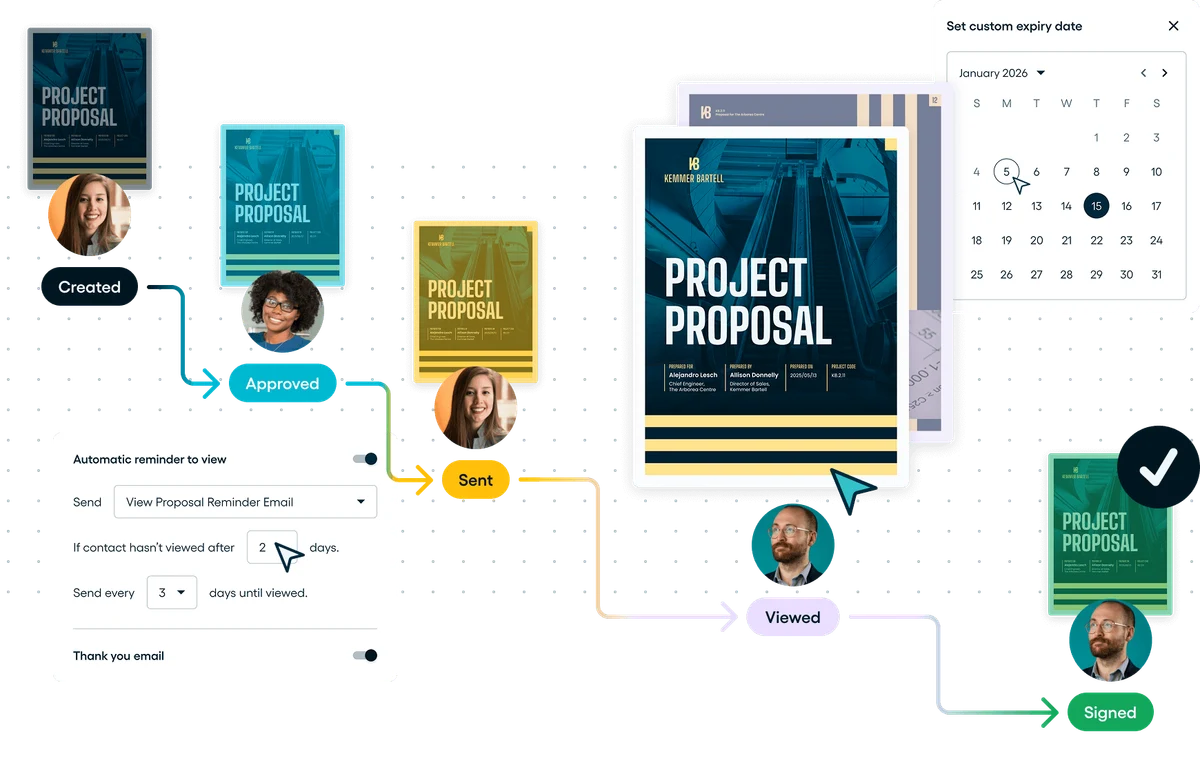
- A view notification is not intent to buy, and not permission to send aggressive reminders. Use it only to time a short message that asks one question about scope, budget or start date.
- Example wording: ‘Would option A (core site) or option B (core site plus maintenance) fit your planning better? If neither works, tell me which part of the scope to revisit.’ Two clear options, no invented deadline, no fake scarcity.
- Stop any sequence when the client replies or the deal closes, and let the owner handle objections personally. Track signature, acceptance, payment and delivery as separate statuses in one client record to avoid duplicates. Opened is not signed, signed is not revenue, and not every tool automates all of this.
5. Run a small pilot and price it honestly
A short pilot shows whether a tool fits your real workflow better than any demo. Run the same approved brief through two tools and judge errors and review effort, not first impressions.
- Produce 10 fictional or anonymized proposals in each tool. Measure creation time, corrections, internal review, the recipient’s mobile experience and archiving. Send only to a dummy recipient, and never enable automatic sending to real clients during a test.
- Success criteria: zero wrong prices, zero wrong recipients, zero unapproved claims; revenue is not a pilot metric. Illustrative budget for 10 offers in one tool: 2 seats at a 35 EUR monthly equivalent = 70 EUR, plus 2 hours of review at 40 EUR = 80 EUR, total 150 EUR, or 15 EUR per offer. Add credits, integration or support only if actually extra.
- Use ChatGPT or Claude for content. Optionally, Codex or Claude Code scripts can check catalog math and duplicate versions in a TEST environment, with a human releasing every offer. Put any time recovered back into discovery, negotiation and delivery.
FAQ
What is the best AI proposal tool?
It depends on your workflow. PandaDoc suits quote-heavy documents with approval, Proposify suits teams with an approved library and catalog, and Qwilr suits interactive web proposals. Run the same brief through two tools before choosing.
Can ChatGPT write a sales proposal?
Yes, if you give it approved inputs: scope, exclusions, catalog prices and terms. Ask it to structure and phrase the offer, cite an input for every figure and mark unknowns TO CONFIRM. It should never invent a price or a client reference.
Claude or ChatGPT for proposals?
There is no universal winner. The quality of your source pack and the rigor of your review matter more than the assistant you pick. Test both on the same anonymized brief and compare how many corrections each draft needs.
Are there free options?
PandaDoc offers a free tier limited to 5 documents per month, but it does not include every Business feature. Before relying on any free plan, verify that approval gates and the features you actually need are available.
What is the difference between a proposal, a quote and an RFP response?
A proposal defines scope, commitments and next steps. A quote lists priced line items. An RFP response follows the buyer’s format and usually needs a compliance matrix, which is a different exercise from the one described here.
Does AI choose the price?
No. Prices come from your approved catalog, calculations should be checked against it, and a human validates the final figures. AI can lay out options clearly, but it should not set margins, discounts or rates.
Can I automate sending?
Not by default. Every offer should pass a review of recipient, terms and approval status before it goes out. Automate reminders and status tracking first, and keep the release of each offer a human decision.
How do I measure the benefit?
Track corrections per offer, cost per offer, cycle time from brief to approved offer, and error-free quality. Do not treat open rates as revenue: a viewed proposal is a signal, not a decision.
Sources · 21/10/2026
Official features and pricing checked on 21 October 2026. G2 ratings are product-level, not a measure of AI accuracy. Taxes and billing terms vary.
Related guides
Continue from the sales presentation to the offer, then prepare client onboarding and the automations that support delivery.
 AI Sales Presentations 2026: From Brief to Client Proposal
 AI Client Onboarding for Agencies: 3 Tools Compared (2026)
 Best AI No-Code Automation Tools in 2026: Make vs Zapier vs n8n vs Activepieces
Find the best AI tool
215 tools listed with features and pricing. Find the one that fits your needs.