
It is Friday afternoon and three client days have blurred together. AI time tracking can turn background activity into a draft that you review, correct and approve, so the timesheet reflects what actually happened. The goal is an accurate record and clearer client conversations, not billing every captured minute. This guide compares Timely, Rize and TimeCamp, then walks through a one-week pilot, a safe reporting workflow and a decision grid.
Quick picks
Timely vs Rize vs TimeCamp at a glance
 Timely
- Best fit
- Consultants and small agencies reconstructing a multi-client day from captured activity.
- Plan
- Starter: 11 USD per user per month, billed monthly, for up to 5 users and 20 projects.
- AI role
- Memory captures work in the background; AutoSheet drafts timesheet entries you review, edit and submit.
- Watch out
- Starter caps you at 20 projects and 5 users. Confirm AutoSheet access in your own workspace.
 Rize
- Best fit
- An independent consultant who wants client-ready reports built from background tracking.
- Plan
- Pro: 23.99 USD per month equivalent, billed annually, one seat and 1,000 AI credits per month.
- AI role
- AI categorization and tagging; Pro adds PDF and CSV client reports, AI automations and agents.
- Watch out
- Pro is a single-user plan. Team is a separate shared workspace with a two-seat minimum.
 TimeCamp
- Best fit
- Teams wanting reviewed project entries inside a wider time and billing workflow.
- Plan
- Starter: 5.49 USD per user per month, billed monthly. A Free plan exists; confirm which plan includes the AI tracker.
- AI role
- Desktop AI tracker for Mac and Windows suggests project and task entries; nothing reaches the timesheet until confirmed.
- Watch out
- The AI tracker captures screenshots to analyse activity. Check what is captured before using it with client data.
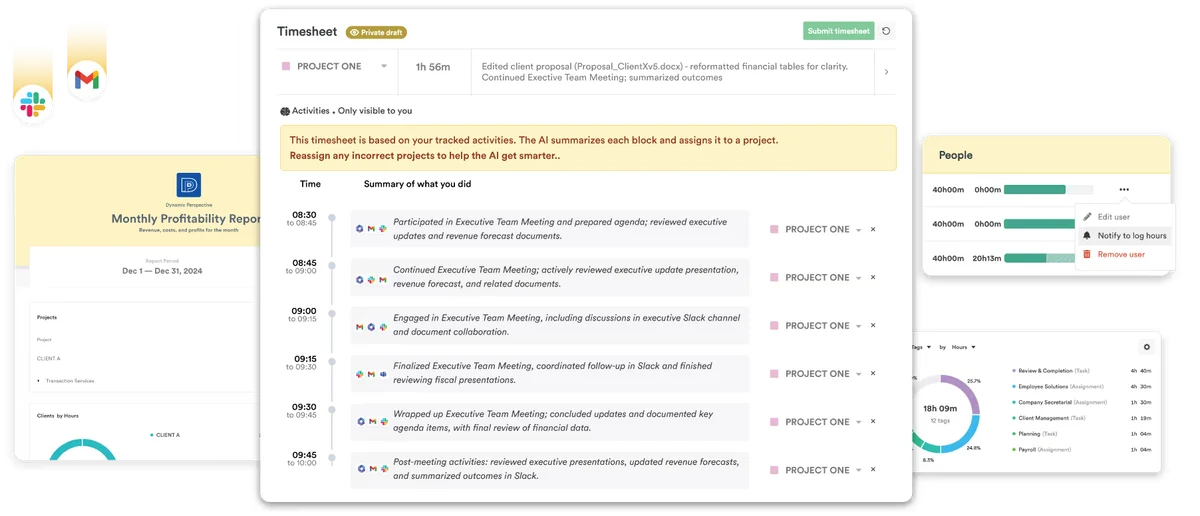
Timely: draft timesheets from background activity
Timely’s Memory app captures work activity in the background, and AutoSheet turns it into a draft timesheet. You review the suggested entries, edit the weekly view and then submit. The pricing page lists AI categorization.
Choose it if your hardest moment is the Friday reconstruction across several clients. Before buying, map your client projects against the 20-project cap and decide who reviews drafts. Run one week with a single consultant, check that AutoSheet works in your workspace, then compare corrections with a normal manual week before adding colleagues.
Rize: solo tracking with client reports
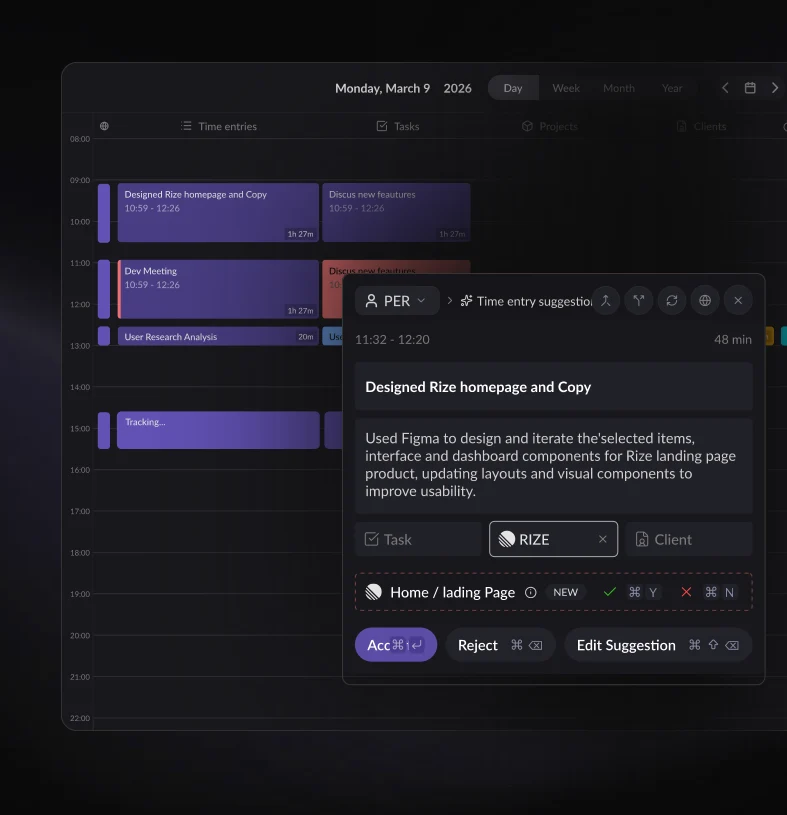
Rize tracks work in the background, lets you tag time by client and project and shows project reports. Credits cover AI chat, reports, automations and agents; when they run out, AI pauses unless you add credits or enable auto-reload, while ordinary tracking continues.
It suits a consultant who sends regular summaries and does not want to build them by hand. Tag clients consistently from day one, because reports are only as clear as the tags behind them. Treat AI-generated report text as a draft and check every figure against reviewed entries before invoicing.
TimeCamp: confirmed AI suggestions for teams
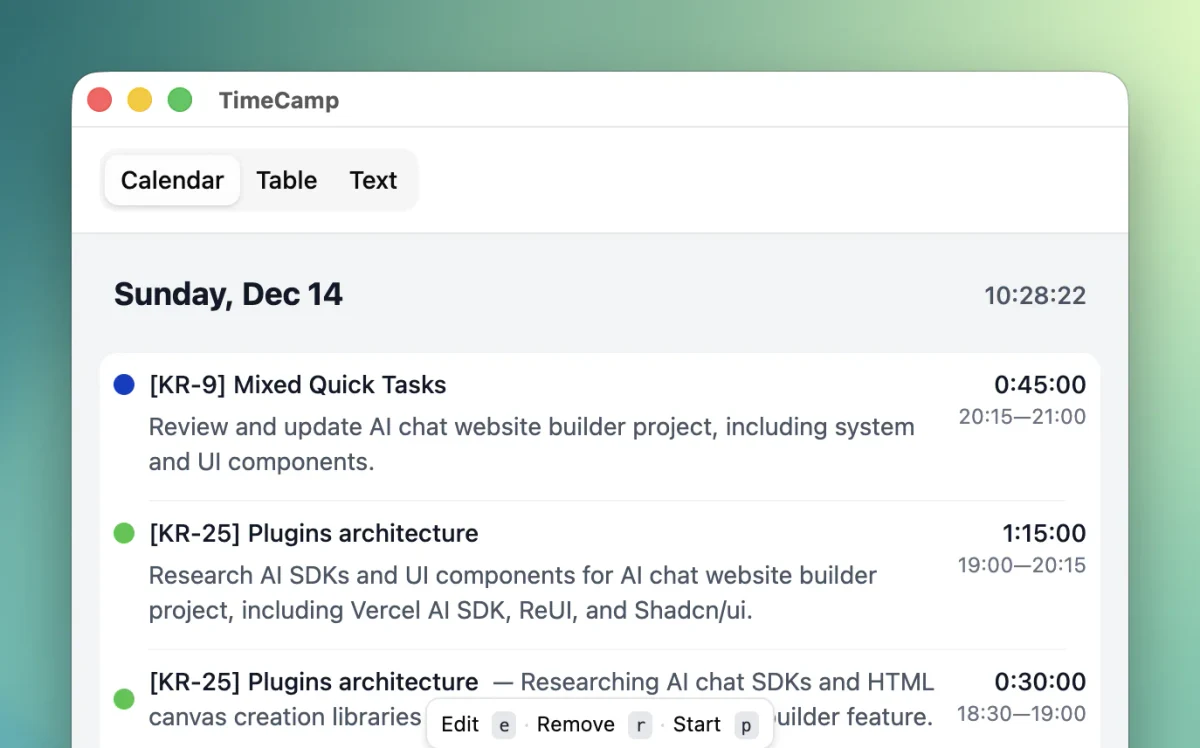
TimeCamp’s AI tracker is a desktop app for Mac and Windows. It captures screenshots and analyses activity to suggest project and task entries, and nothing appears in the timesheet until the user confirms. This differs from ordinary keyword-based tracking.
Consider it when the team already needs projects, approvals and billing in one place and wants AI suggestions inside that flow. Confirm in writing which plan unlocks the AI tracker. Tell staff exactly what screenshots record, keep them out of performance reviews and start with non-sensitive projects.
From activity to approved billable time
Captured activity is raw material. It becomes a reviewed hour after someone checks it, and a billable hour only when the client agreement says so. Keep those three stages separate in every workflow.
- Picture an agency day: 45 minutes on a proposal for client A, 60 minutes of delivery for client B and 15 minutes of internal admin. Whether the proposal time is billable depends on client A’s contract, not on the project tag the tool applied.
- A calendar invite may say 60 minutes while the call actually lasted 45. Do not assume the tool books the real duration. Every approved entry should carry client or project, date, start and end, duration, task description, source, review status and billable status.
- Record offline calls and site visits manually, using the times you actually noted, never minutes estimated later to fill a gap. If the calendar and the desktop app both log the same meeting, keep one entry and mark the other as a duplicate before approval.
Configure a one-week pilot
Start with one person, two client projects and one week. The setup below is our suggested process, not a description of every product feature, and the time it takes depends on your accounts.
- Create a separate project and code for each client, plus one non-billable admin project. Describe each project with example activities, such as the client’s domain, document names or recurring meeting titles, so suggestions have something concrete to match against.
- Limit tracking to the browsers and apps used for work and avoid recording personal content you do not need. Check privacy settings, roles and, with TimeCamp, screenshot capture. Never rank staff by keyboard activity or screenshots: this is time recording, not performance surveillance.
- Review the day’s unassigned, overlapping and mislabeled entries every evening, while memory is fresh. A human approves each correction: the tool proposes, the person decides. Note which corrections repeat, because they show where project descriptions need sharpening.
Drafting client reports with ChatGPT or Claude
A general assistant does not capture time, but it can turn a reviewed export into a clear summary. Keep calculations in a verified spreadsheet and use the chat only for wording and clarity.
- Export only reviewed, anonymized rows: entry ID, project ID, date, start, end, duration, task, billable flag, approved flag. Prompt: ‘Group these entries by project and summarize the work. Do not add durations, rates or claims. Mark anything unclear as TO CONFIRM. Flag overlaps and possible duplicates. Do not send or invoice.’
- Example: 180 approved minutes at 80 EUR per hour equals 240 EUR before tax. That is theoretical billable value, not revenue collected. If the contract sets a fixed fee, extra hours are not billable unless the agreement allows it. The spreadsheet, not the model, is the source.
- Optionally, ask Codex or Claude Code to write an offline CSV validator that flags duplicate IDs, end times before start times and overlapping entries. Run it on a fictional fixture first. It should report problems for human review and never delete billable hours automatically.
Compare the real plan and workflow
Four approaches exist: manual timers, passive capture, AI suggestions and broader PSA suites. Match the plan to your team size and review habits rather than to the longest feature list on the page.
- A solo consultant can look at Rize Pro, but a team needs the separate Team workspace. Timely Starter stops at five users and 20 projects. A TimeCamp Starter subscription alone does not prove that the AI tracker is included, so check before committing.
- Before any annual purchase, ask about AI quotas, export formats, approval roles, data retention, the exact operating systems supported and integration with your client billing tool. Note the answers and the date you received them, so you can recheck them at renewal.
- At low volume, an existing timer or spreadsheet plus a drafting assistant may be enough; there is no reason to buy all three. And AI-captured hours never justify a larger invoice without terms the client has already agreed to.
Review the week and use the patterns
After the pilot week, decide with evidence rather than impressions. Measure what changed in the review work, inform clients with approved summaries and use the patterns to plan future projects more realistically.
- Log manual timesheet minutes, unassigned time, corrected project tags, duplicates found and the reviewer’s confidence in the final sheet. Compare with a normal week. These are signals for a decision, not a promised return on investment, so write them down daily.
- Hypothetical first month: 30 EUR of software plus two hours of setup valued at 40 EUR per hour gives 110 EUR. This is an illustration, not a vendor price, and the recurring review time must be counted separately every month afterwards.
- Share approved summaries with clients, never raw activity logs or screenshots. As the owner, use the patterns to scope conversations and produce better estimates; let employees spend their attention on delivery, client decisions and relationships rather than on rebuilding timesheets.
FAQ
What is the best AI time tracker for a consultancy?
It depends on how you capture work, what reports you send and whether you work alone or in a team. A solo consultant needing client reports may lean towards Rize; a small team reconstructing multi-client days may prefer Timely. Pilot before committing.
What is the best AI time tracker for an agency?
Pick the tool with the clearest review workflow for your clients, not the one that monitors the most. Compare approval roles, project limits and exports. Timely and TimeCamp both suit teams, but check plan limits and AI access first.
What does AI add compared with an automatic timer?
An automatic timer records which apps or keywords were active. AI tools go further by proposing which client, project or task the activity belongs to. You still review those proposals, because a suggestion is not an approved entry.
Do free plans include AI features?
Not necessarily. TimeCamp offers a Free plan, but which plans include its AI tracker should be confirmed on your account. Rize Pro includes a monthly AI credit allowance. Check AI access and quotas on your exact plan before relying on them.
Can ChatGPT or Claude track my time on their own?
No. They do not capture activity automatically. They are useful for drafting client reports or task descriptions from a reviewed export. Keep durations and amounts in a verified spreadsheet and check every draft before it reaches a client.
Is captured time automatically billable?
No. Captured time becomes billable only after review and only under terms the client has agreed to. A fixed-fee contract, an internal task or a short courtesy call may not be billable, whatever label the tool applies.
What about screenshots and privacy?
TimeCamp’s AI tracker captures screenshots to analyse activity, so check what is captured before using it with client data. Do not generalize to other tools: verify each product’s capture settings and tell your team what is recorded and why.
How should I handle offline work and calendar duplicates?
Add offline calls and visits manually, using the times you noted. When the calendar and the desktop tracker both log a meeting, keep one reviewed entry, correct its real duration and mark the other as a duplicate before approval.
Sources · 23/10/2026
Official pricing and features checked on 23 October 2026. G2 scores reflect product reviews, not AI accuracy.
Related guides
Document repeatable tasks, follow up invoices and connect your tools with these practical guides.
 AI SOP Software for Small Teams: Practical Guide 2026
 AI Invoice Follow-Up Tools for Service Businesses (2026)
 Best AI No-Code Automation Tools in 2026: Make vs Zapier vs n8n vs Activepieces
Find the best AI tool
215 tools listed with features and pricing. Find the one that fits your needs.