
Getting paid starts well before the first reminder. Work is delivered, the invoice is checked against what was agreed, and only verified balances enter a follow-up sequence. AI can draft polite emails and help sort replies, but a person still handles disputes, partial payments and anything ambiguous. This guide sets out that workflow, gives you a prompt and two email templates, and compares three receivables tools on what their vendors actually publish, with information checked on 22 October 2026.
In short
Three receivables tools with AI features, compared
 Chaser
- Best for
- Small finance or admin teams wanting structured reminder workflows and help drafting replies to debtor emails.
- Plan
- Compact from 259 USD/month billed monthly, with 4 users and 4 automated receivables workflows.
- AI role
- Analyses the intent of incoming debtor emails and drafts a reply with invoice context for you to edit and send.
- Watch out
- Four users and four workflows on Compact. Confirm in writing that the AI email generator is included in that plan.
 Upflow
- Best for
- Growing B2B finance teams with enough invoices to justify an annual contract and a configurable collections agent.
- Plan
- Quote only, annual commitment, priced on annual gross invoice value and invoice volume, unlimited seats.
- AI role
- Collections Agent interprets disputes and promises to pay, routes complex accounts to a person, autonomy from suggestion to automatic.
- Watch out
- Collections Agent requires a higher plan and fair-usage limits apply. The free Discover plan covers analytics, not collections.
 Kolleno
- Best for
- Structured finance teams with several collectors and approval rules, not freelancers or businesses on a tight budget.
- Plan
- Business Plus from 1,990 USD/month equivalent, billed annually: 995 USD per user, two-user minimum.
- AI role
- Maestro AI uses customer context to flag prioritised actions while keeping permissions, approval workflows and logs.
- Watch out
- Confirm AI access and exact modules in your quote. Too expensive if you only send a few invoices each month.
Chaser: structured reminders with AI-drafted replies
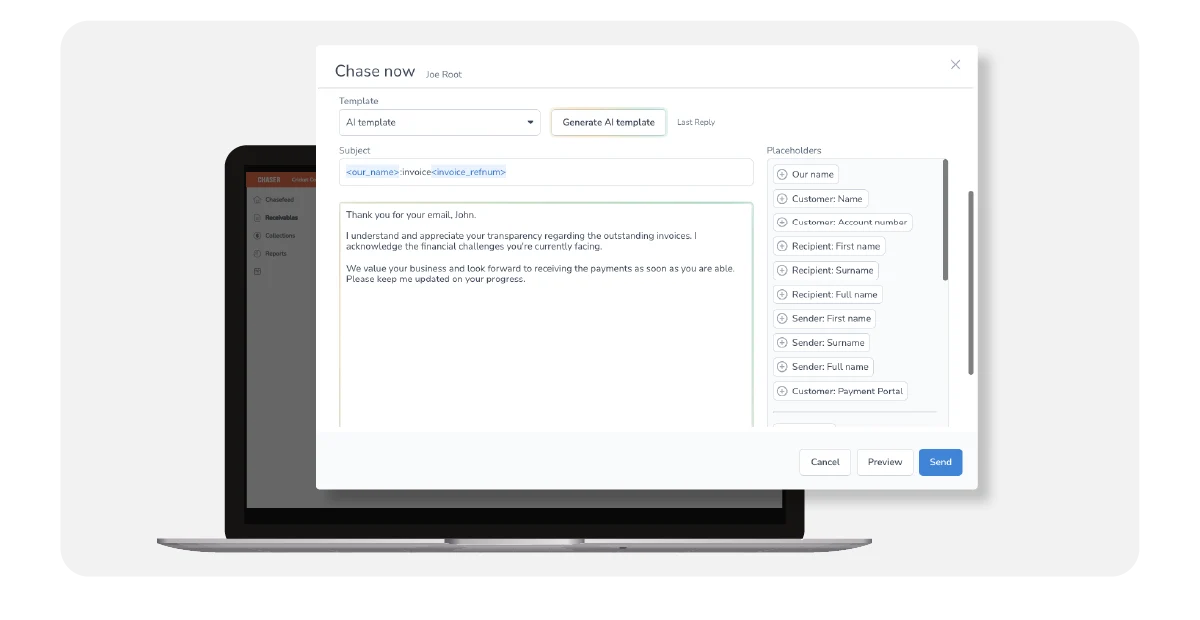
Chaser is receivables software, not the project management tool with a similar name. Its AI email generator analyses the intent of an incoming debtor email, then drafts a reply using invoice context, which a user edits and sends.
It suits a business that already invoices from an accounting system and loses time answering client replies rather than writing first reminders. Ask whether AI drafting is part of the exact plan you are quoted before comparing it with simpler options. Keep a person reading every draft: the tool proposes wording, but you remain accountable for what reaches the client.
Upflow: a collections agent for growing B2B finance teams
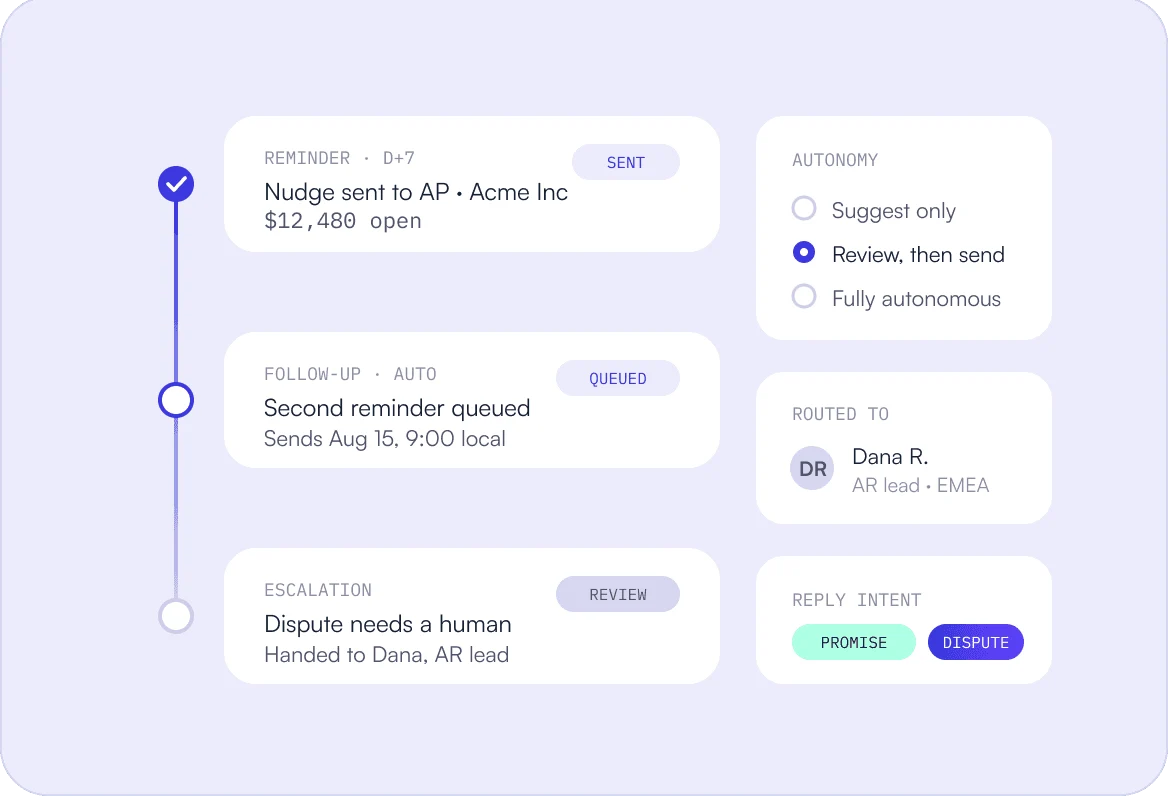
The Insights Agent is available on all plans, while the Collections Agent and cash application sit on higher tiers, subject to availability and fair usage. The Collections Agent reads disputes and promises to pay and can hand complex accounts to a human.
Upflow makes most sense once receivables have become a team process with several people and recurring disputes. Start the agent at suggestion level so your team can see how it classifies replies before granting more autonomy. Because pricing depends on invoice value and volume, request a written quote based on your real figures rather than a rough estimate.
Kolleno: Maestro AI for structured finance teams
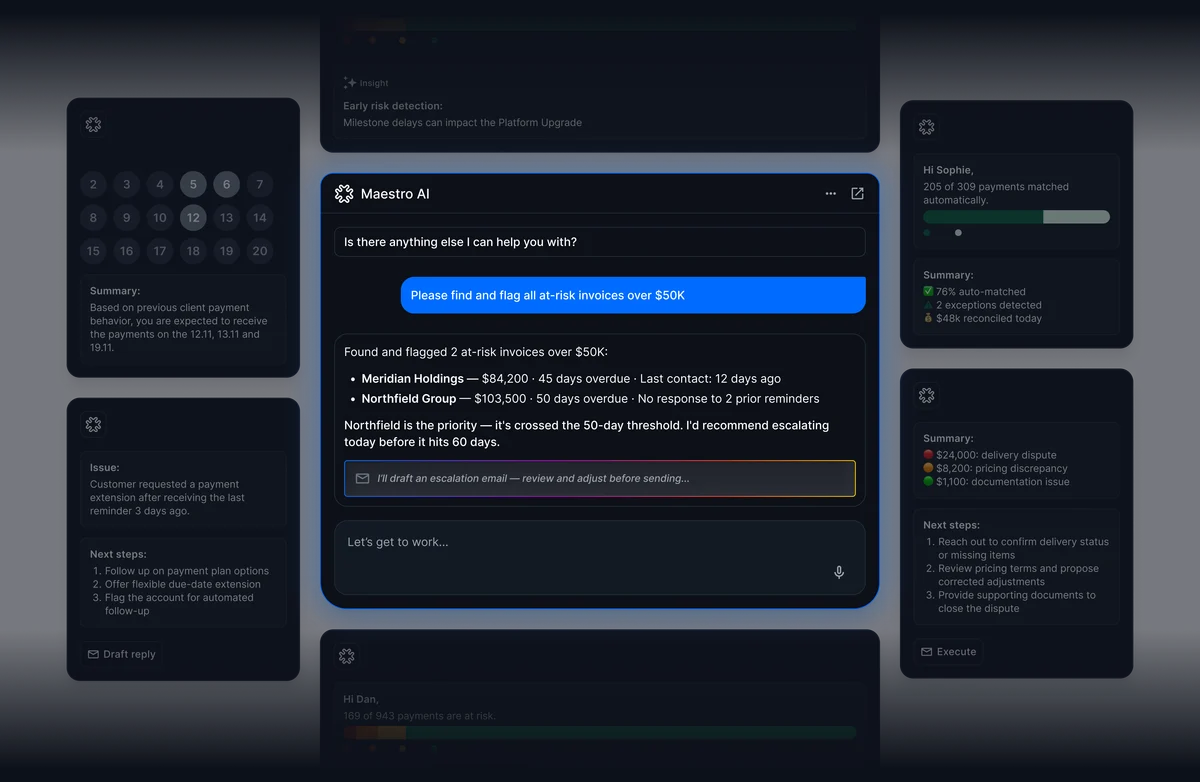
Business Plus lists the AI agent, a collections inbox and workflow automation; the Business Pay plan does not list the AI agent. Automatic reconciliation is listed under Enterprise. Maestro AI flags prioritised actions while keeping permissions, approvals and logs.
Kolleno fits a finance function that already works with approval steps and audit trails and wants AI suggestions inside those controls. Before signing, ask the vendor to list in the quote every module and AI feature you will actually receive. For a small studio sending a handful of invoices, the reminders in its existing accounting system are probably enough.
1. Build a reliable unpaid-invoice ledger first
Every reminder inherits the quality of the data behind it. The source of truth is your accounting record, not a language model summarising emails. Before automating anything, make sure each open invoice carries the fields a reminder needs.
- Track for each invoice: ID, customer entity, currency, amount, due date, payments received, credit notes, outstanding balance, billing contact, dispute status, any promised payment date and the time of the last sync. Missing essential details, such as the balance or recipient, block a reminder; a promised payment date is optional.
- Check the arithmetic with a hypothetical case: a 1,000 invoice, a 400 payment and a 100 credit note leave 500 outstanding, all in the same currency. If your system shows a different figure, resolve the gap before any email goes out.
- Keep three states apart: promised, received and reconciled. A promise is not cash, and a bank receipt is not proof that an invoice is matched. Never chase an invoice that may already be paid or whose balance nobody has verified.
2. Design a reminder sequence with human exceptions
These are process recommendations for your own workflow, not a description of what every product does. Agree a cadence, define when reminders stop, and decide which situations always go to a person rather than to automation.
- Agree a cadence, for example a courtesy note before the due date, then spaced reminders after it. Pause the sequence as soon as the client replies, pays or raises a dispute, and keep it paused until someone has reviewed the account.
- Use three states: ready to draft, approved to send and blocked. A missing purchase order or an incorrect recipient blocks the invoice until a person fixes it, because a reminder sent to the wrong contact damages trust and rarely gets paid.
- Leave legal threats, late fees and payment rules out of automated drafts; those decisions belong to you and your advisers. The person who owns the client relationship should handle disputes and sensitive accounts personally, by phone or direct message.
3. A prompt and two email templates for ChatGPT or Claude
ChatGPT or Claude can draft wording, but they are not your ledger and are not natively connected to your accounts in this workflow. Paste only verified fields. Optionally, Codex or Claude Code can check a fictional export for duplicates or missing IDs; simple workflows do not need this.
- Prompt: “Using only the invoice fields below, which I have verified, write a short, friendly payment reminder. Mark any missing information as TO CONFIRM. Do not send anything. Do not invent bank details, payment links, fees or dates.” Then paste the approved fields and review the draft yourself.
- Template 1, friendly overdue reminder: “Hello [name], a quick note that invoice [invoice], due on [due date], shows a verified balance of [verified balance] [currency]. If it has already been paid, please disregard this message. If you have any question, simply reply and I will help.”
- Template 2, partial payment reply, with hypothetical figures: “Thank you for your payment of 400. After a credit of 100, the remaining balance on [invoice] is 500 [currency]. If your records show a different amount, please let us know so we can check together.” Mention the 400 only once it is verified.
4. Choose a tool by your real bottleneck
Invoice software covers three distinct jobs: creating invoices, following up receivables, and processing supplier invoices on the payables side. Identify which one actually costs you time before comparing products; the three tools above address receivables follow-up.
- If you send a few invoices a month, start with the reminders built into your current accounting system, plus a human review before each send. Buy dedicated software only once the volume of replies, disputes or accounts clearly outgrows that setup.
- Check connectors against your exact accounting edition, the sync frequency, supported currencies, how replies are handled, which plan includes AI and any implementation fees. Note that Upflow’s free Discover plan provides analytics, not free reminders or collections.
- Run a small pilot before any annual commitment, and do not expect one-click setup: mapping contacts, entities and dispute codes takes time. Ask for AI features, user limits and modules in the written quote rather than relying on a demo.
5. Pilot on ten fictional invoices
A pilot shows whether the workflow behaves as intended before real clients receive anything. Build a fictional set covering the awkward cases, write down the expected action for each one, then compare the tool’s behaviour with your plan.
- Include paid, partially paid, credited, disputed, promised, duplicate, missing-contact and other-currency invoices. Document the expected action before testing. Aim for zero erroneous reminders, and treat that as a pass criterion to verify, not a result anyone can promise in advance.
- Measure manual minutes per invoice, corrections to drafts, false chases and replies handled. Days sales outstanding also moves with payment terms and seasonality, so a change after the pilot is a signal to investigate, not causal proof of the tool’s effect.
- Budget the total: software, AI options, setup and staff review time. Give approvals and accounting data only to people and tools with appropriate access, and spend any time freed on delivery and client conversations, not on automating commercial judgment.
FAQ
What is the best AI tool for invoice follow-up?
There is no universal winner. It depends on your invoice volume, team size and the bottleneck you need to fix. Low volume often needs only accounting reminders, while larger finance teams may justify dedicated receivables software.
Is an invoice generator the same as invoice follow-up software?
No. An invoice generator creates and sends the invoice document. Follow-up software tracks what remains unpaid, sends reminders and helps handle replies. Many accounting systems cover both at a basic level, which suits many small businesses.
Can ChatGPT or Claude help with payment reminders?
Yes, for drafting. Give them only verified invoice fields, ask them to mark unknowns as TO CONFIRM, and review every draft. They do not hold your ledger, so they cannot tell whether an invoice is paid.
Is Upflow free?
Upflow offers a free Discover plan focused on analytics. It is not a free collections tool: reminders and collections run on paid, quote-based plans, and the Collections Agent sits on higher tiers.
How do I avoid chasing a client who has already paid?
Sync payments before each send, block any invoice with an unreconciled receipt, and pause sequences when the client replies. Add a line inviting the client to disregard the message if payment has already been made.
How should partial payments and disputes be handled?
Update the balance from your accounting record, confirm the remaining amount, and acknowledge the payment only once it is verified. A dispute pauses the sequence and goes to the person who owns the client relationship.
Does a promise to pay count as cash in my forecast?
A promise is a forecast input, not a confirmed receipt. Record it separately. Confirm a receipt against the bank record, then match it to the right invoice before updating the outstanding balance.
What should I check about AI pricing and user minimums?
Check which plan actually includes the AI features and whether a minimum user count applies. Kolleno, for example, lists its AI agent on Business Plus rather than Business Pay, with a two-user minimum. Confirm everything in writing.
Sources · 22/10/2026
Official features and pricing checked on 22 October 2026. G2 scores reflect product reviews, not AI accuracy.
Related guides
Connect proposals, client onboarding and reviewed billable hours to your invoicing workflow.
 AI Sales Proposals and Quotes 2026: A Practical Buyer Guide
 AI Client Onboarding for Agencies: 3 Tools Compared (2026)
 AI Time Tracking for Agencies and Consultants: 2026 Guide
Find the best AI tool
215 tools listed with features and pricing. Find the one that fits your needs.