
Vibe coding has made building fast: you describe a feature, an agent writes it, the app runs. The next question comes quickly: who will check what you had built? Co-Review proposes handing the review to an AI agent, then giving control back to a human to sort what it found. We tried it on a small, concrete case with a hidden bug.
What Co-Review sets out to do
Co-Review is open source software released under the MIT license. Its README describes a review space where an AI agent posts findings, anchored to specific symbols and tokens in the code, which you then keep or dismiss. The workflows documentation covers several uses: reviewing a whole repository, a change, a third-party PR or a design. Review data is stored separately from the repository.
Two connection modes are documented: plugging in an agent you already use via MCP, or letting Co-Review launch an agent via ACP. The tool also shows read coverage, meaning the files the reviewer has marked as read. This is not test coverage: knowing a file was read does not mean it was executed. We found the project through Product Hunt; its website presents the whole picture.
Our trial: a VAT bug hidden in a quote service
We built Co-Review from source (commit b6dc613, browser version 0.9.2) on macOS. Installing dependencies with npm install and then building with make browser both succeeded. The tool ran locally, with a storage directory reserved for the test.
The demo repository contained two JavaScript files: a small quote service, with no personal data. We introduced a VAT calculation error without telling the agent that it existed or where it was. Claude Code was connected to Co-Review via MCP over HTTP.
A note on scale: two files and one planted bug are neither a production application audit nor an accuracy measurement. The trial answers a simpler question: does the mechanism work, and is what it produces verifiable?
What the agent found, and what we checked
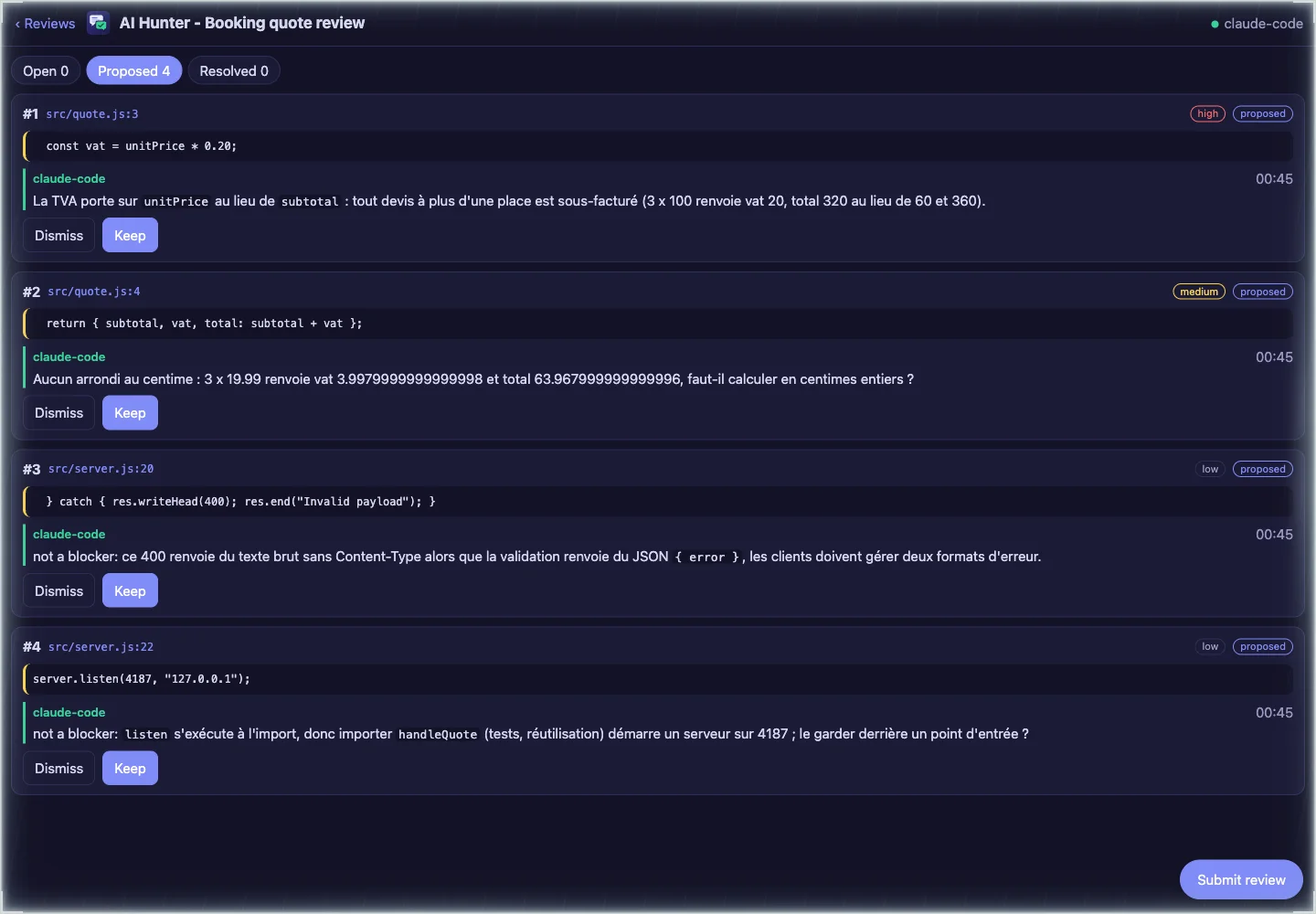
Claude created a review with a file map, an overview and four proposed findings.
| Finding proposed by the agent | Proposed severity | Our check | Result |
|---|---|---|---|
| VAT calculated on the unit price instead of the subtotal | high | Ran quote(3, 100) | Subtotal 300, VAT 20, total 320; expected: VAT 60, total 360. Confirmed |
| No monetary rounding | medium | Ran quote(3, 19.99) | Total 63.967999999999996, VAT 3.9979999999999998. Confirmed |
| Inconsistent HTTP error formats | low | Read the code, no HTTP test | Finding consistent with the code |
| Server started on module import | low | Read the code, no HTTP test | Finding consistent with the code |
The planted bug was found and ranked first. The missing rounding is a real defect for a tool that produces amounts. The last two points are about code quality and maintenance, not security. So the useful result is not “four problems”, but one serious business logic error, one real calculation defect and two minor remarks, ranked in a consistent way.
The interface: main view stuck, mobile view usable
The main interface of the browser version, built from source, stayed on its loading screen in our environment, even after reloading. We did not determine the cause, and nothing here supports any conclusion about the desktop versions.
The mobile view, available at /m/ in Chrome, did work. It shows the four findings with the file, the lines involved and a code excerpt, along with Keep and Dismiss buttons. Clicking Keep on the VAT finding registered correctly: the counter changed to Open 1, Proposed 3.
We went no further: no patch applied, no final verdict sent, no GitHub PR published, no threaded conversation tested. These features are documented; our trial cannot judge them.
Agent and interface: two roles not to confuse
The trial makes the split of roles clear. The quality of the findings comes from the agent, here Claude Code: it reads the code, spots the VAT error and proposes a severity. Co-Review provides the frame: review structure, findings anchored in the code, read coverage and human triage between what you keep and what you dismiss.
With another agent, findings may therefore be better or worse, and an interface problem says nothing about the relevance of the analysis.
Free and local: two words to read closely
The software is free, but the agent that writes the review runs under the terms of your provider or subscription. Allow for any agent usage costs and the time spent reviewing.
Likewise, running Co-Review locally does not mean your code stays on your machine: with a remote model, code supplied to the agent may be sent to its provider. This echoes what we described about open source alternatives to SaaS: an open license shifts costs and dependencies, it does not remove them.
Who is it for?
Worth trying if you are a developer reviewing more and more agent-written code, if you are a founder working with a technical person and want a structured first pass before signing off, or if you already use an MCP-compatible agent and want to triage its remarks somewhere other than a terminal.
Skip it if you expect a tool that fixes code on its own and guarantees the result, if nobody on the team can judge a finding by reading the code, or if you have not yet checked how the chosen agent handles your code.
To automate checking through execution rather than reading, our selection of the best AI software testing tools covers a complementary need.
How to run your own trial
- Follow the installation instructions in the official README for the version that applies to you.
- Prepare a small repository with no personal data or secrets, containing a bug you know about and do not tell the agent about.
- Choose your agent’s connection mode, MCP or ACP, using the workflows documentation.
- Run a whole-repository review, then compare the findings with what you know about the code.
- Check each finding yourself, by running the code when possible, before keeping it.
- If the main interface does not load, try the mobile view at /m/, which worked for us.
Our verdict
The core mechanism works in our trial: the agent found the planted bug, ranked it first and proposed verifiable findings, which the mobile view lets you triage. The full experience, from the main interface through to the patch and the PR, remains to be validated. Co-Review is worth a try for anyone who wants to regain control over AI-generated code, as long as you see it as an assisted review tool, not an autonomous fixer.
FAQ
Is Co-Review free?
The software is released under the MIT license and costs nothing. The agent that writes the review, however, depends on your provider or subscription, so a free license does not guarantee a zero total cost.
Does my code stay on my machine?
Co-Review runs locally, but that only applies to the review tool. If you use a remote model, code supplied to that agent may leave your machine. Check the selected model and its provider’s terms.
Does Co-Review fix code automatically?
We did not observe that. In our trial, the agent proposed findings and we kept one; no patch was applied and no PR was published. A proposed fix still needs a human to read and test it.
Do I need to know how to code to use it?
Largely, yes. Installation relies on development tools and each finding has to be judged by reading the code. A non-developer founder will get the most out of it alongside someone who can validate fixes.
Related guides
Comparisons and guides covering adjacent topics.
Tools mentioned
Find the best AI tool
215 tools listed with features and pricing. Find the one that fits your needs.